Information taken from ExpressVPN's official pages, checked on October 24, 2026. This page contains affiliate links.
ExpressVPN free trial: the short answer before you start searching
If you type “ExpressVPN free trial”, you land on videos promising “30 days free in 2 minutes”, on forum threads where everyone tells their own story, and on comparison sites that all repeat the same line. The reality, as read on ExpressVPN’s official pages on October 24, 2026, comes down to three points. There is no 30-day free trial. There is a free 3-day trial, limited to the iOS and Android mobile app. And there is, for any new subscriber who buys on the website, a 30-day money-back guarantee that works as a risk-free trial.
This guide explains the difference, how to use each option without getting caught out, which conditions many pages leave out (first purchase only, App Store purchases excluded, a deadline that runs to the hour) and what you can do if you really do not want to put any money down. It deliberately contains no “free trial code”: the official offers are shown on ExpressVPN’s own site, and the codes circulating on third-party pages have no official value.
ExpressVPN has no 30-day free trial. What exists: a 3-day trial on iOS and Android, and a 30-day money-back guarantee for new subscribers who buy on the website.
- The guarantee does not cover subscriptions bought through the App Store or Google Play.
- It is limited to first purchases: an account or payment method that has already been refunded no longer qualifies.
- Nothing to pay upfront: Proton VPN Free, no credit card, but more limited.
See the ExpressVPN offer → 30-day money-back guarantee for new subscribers who buy on the website.
Free trial or money-back guarantee: the difference that matters
A classic free trial asks nothing of you at the start. You open an account, use the service for a few days, and if you do nothing, it all stops. A money-back guarantee works the other way round: you pay first, you use the service, and you can ask for your money back if you change your mind within the stated window.
ExpressVPN owns this difference. Its official guarantee page answers the question “Is there a 30-day free trial?” with a flat no, and presents the guarantee as a better option than a trial: according to the company, a typical trial only gives you a limited demo on a single device, whereas the guarantee gives you the whole service, on all your devices, for 30 days. That is a sales argument, but it holds up in practice: during the guarantee you do have the full subscription you paid for.
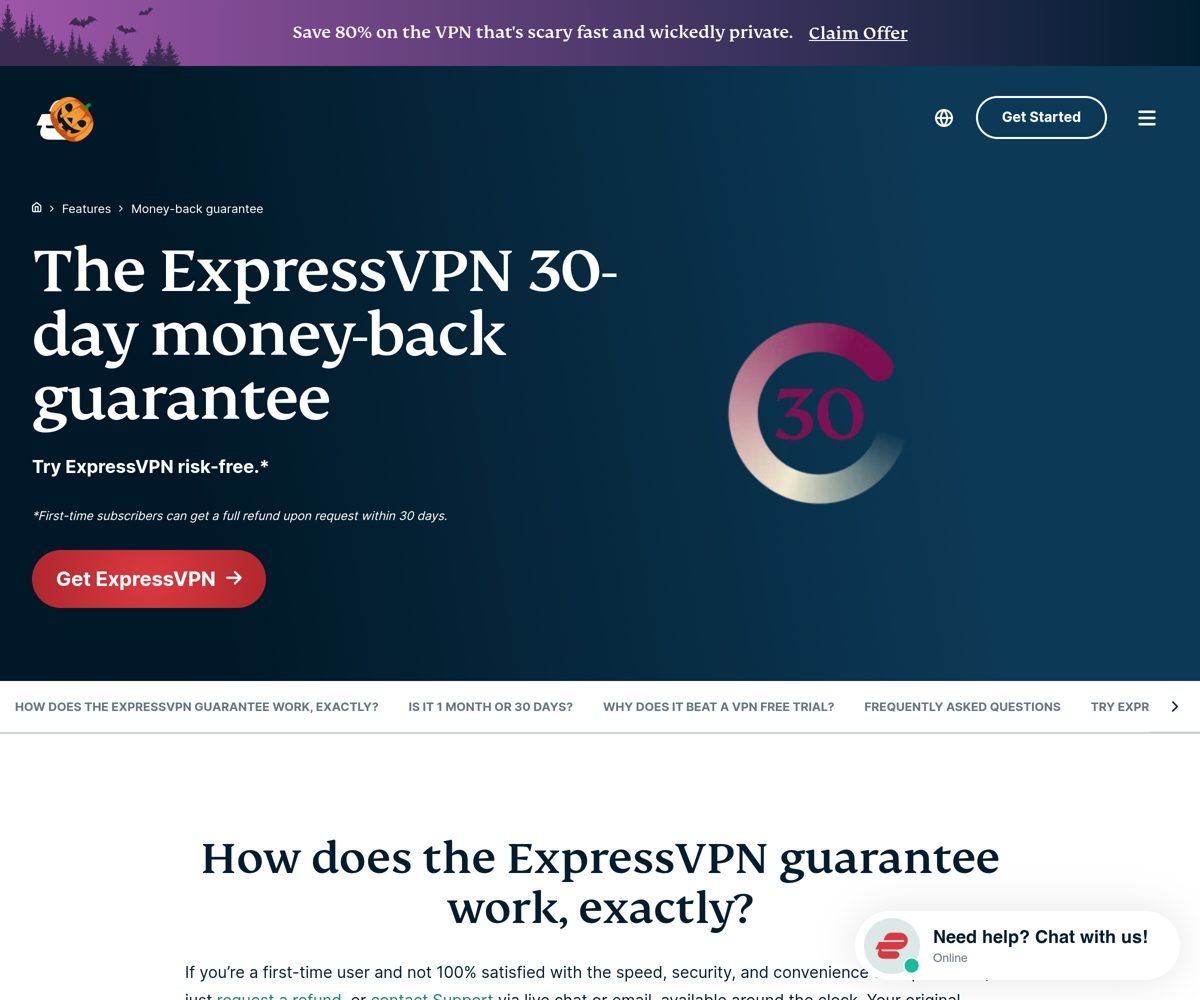
The flip side is that you have to front the price of a subscription. On the pricing page we checked, ExpressVPN only sold two-year plans (plus four months), so what you front is the amount of a long plan, refundable if you act in time. We detail the amounts below.
The 3-day trial on mobile: what to expect
According to the official guarantee FAQ, ExpressVPN offers a free 3-day trial on iOS and Android mobile devices. You activate it by downloading the app from the App Store or from Google Play. That is all the company says on that page: no detail on how billing works at the end of the trial, or on whether it can be combined with the 30-day guarantee.
We noticed that third-party sites describe a different length (7 days in some cases, 3 days in others) and that some comparison sites have removed this information from their pages. These gaps are probably explained by the offer varying with the period, the country and the app store. Three precautions are therefore in order:
- Read the app’s store listing (App Store or Google Play) before starting the trial: it shows the length, the price that will be charged at the end and the date it switches to a paid subscription.
- Put the end date in your calendar and cancel in your Apple or Google account settings, before it runs out, if you do not want to continue.
- Do not count on the 30-day guarantee if you then subscribe from inside the app: in-app purchases through Apple or Google are not covered, and a refund then depends solely on Apple or Google.
For a simple look at the interface on your phone, the mobile trial may be enough. To test the service on a computer, a television or a router, it does not replace the guarantee.
The 30-day guarantee: step-by-step instructions
Here is how to use it in practice to run a complete, risk-free test, within the conditions published by ExpressVPN.
- Buy on ExpressVPN’s website, not in the app. This is the condition for being covered by the guarantee. You can go through our ExpressVPN partner link, which leads to the official site.
- Check that you are eligible. The guarantee is for new subscribers. An account or payment method that has already been refunded in the past no longer qualifies.
- Note the exact time of the order. The guarantee lasts exactly 30 days, not a calendar month. ExpressVPN’s own example: an order placed on July 1 at 8 a.m. can be refunded until July 31 at 8 a.m.
- Test it properly. Install the app on the devices that matter to you (computer, phone, television), use it for what you actually plan to use it for, and write down what bothers you.
- Decide before the deadline. If you are not convinced, open the support chat or write to support before the limit and ask for a refund under the guarantee. Support is advertised as available 24/7.
- Get your money back. The refund covers the full amount of the order and goes back to the original payment method, with no precise timeframe announced.
One useful point: the company explains that the applicable conditions are the ones in force at the time of purchase, which can vary by plan, purchase method or promotion. So check the notice shown at checkout, especially during promotional periods.
How much do you have to front to use the guarantee?
ExpressVPN’s prices depend on the country, the currency and the current promotion. We recorded two things on October 24, 2026. On the English pricing page, opened from a US IP address, the prices appear in US dollars, with three plans covering 28 months (two years plus four months) and a promotion advertised at up to 80% off (a Halloween offer, communicated as valid until November 3, 2026):
| Plan | Advertised price per month | Total for the first 28 months | Price without promotion | Annual renewal | Devices |
|---|---|---|---|---|---|
| Basic | $2.99 | $83.72 | $419.72 | $99.95 | 10 |
| Advanced | $4.49 | $125.72 | $475.72 | $119.95 | 12 |
| Express Pro | $7.49 | $209.72 | $643.72 | $199.95 | 14 |
Source: ExpressVPN pricing page in English, checked from a US IP address on October 24, 2026. Prices change with promotions: always check on the site before buying.
For readers in the euro zone: the French version of the page (/fr/), checked on the same day, showed prices in euros: Basic at €2.49 per month, Advanced at €3.99 and Express Pro at €6.49.
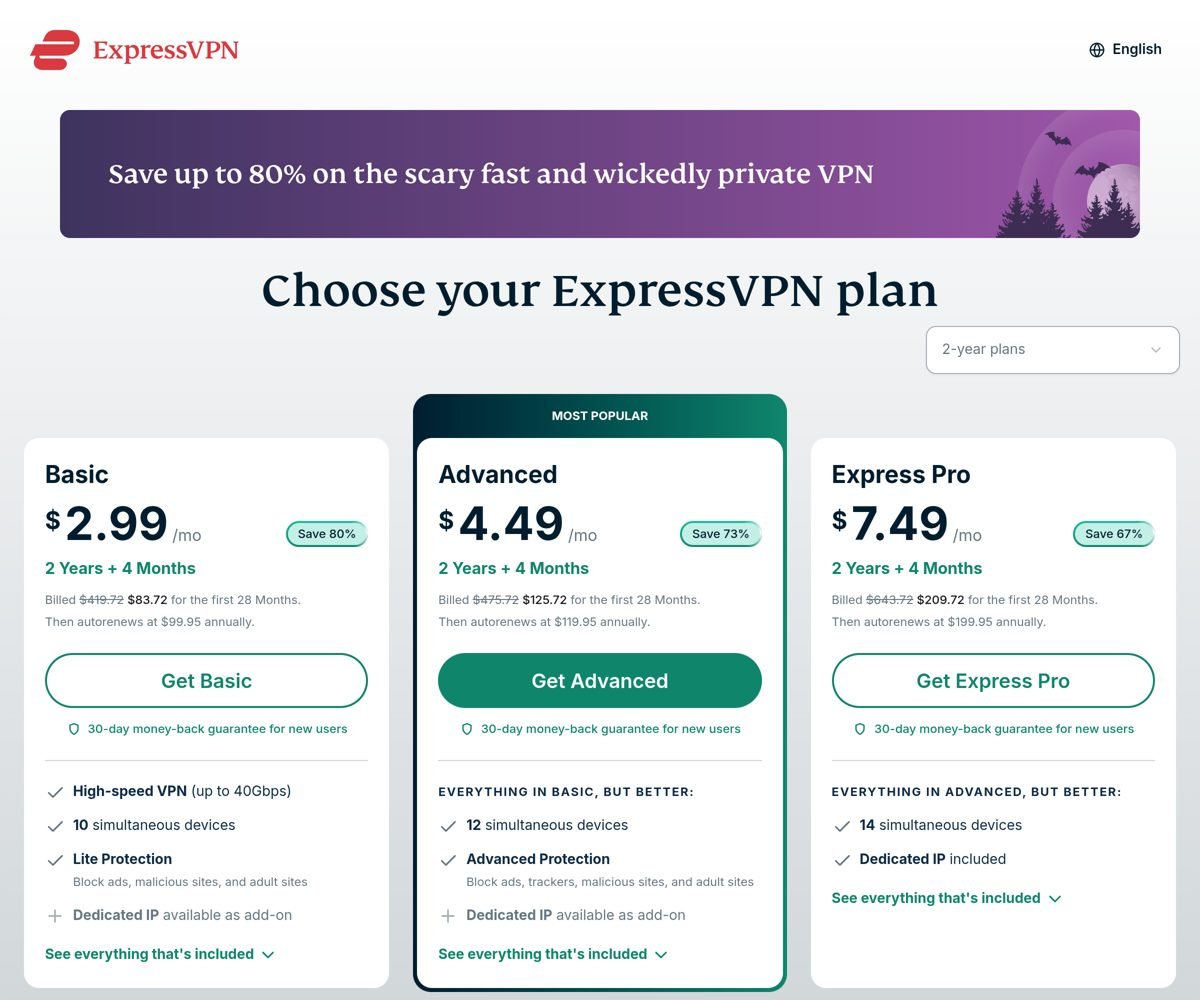
The English US page displays dollars, while the French page (/fr/) checked in euros shows that price and currency follow the billing country. The amount you will actually front therefore depends on your country of billing.
What this means for a trial: with the Basic plan, you front about $84 at purchase, which you get back if you request a refund within 30 days. It is the cheapest plan per month, but it is also the one that commits you the longest. If you are hesitating, remember that the renewal following the first period is billed at the displayed annual rate, much higher than the headline price.
ExpressVPN had not announced a 2026 Black Friday offer at the time of writing. If a special rate is published, it will appear on the pricing page, and we will update this article.
The traps to know about before you start
Buying inside the app. This is the costliest trap. A subscription made through the App Store or Google Play goes through Apple’s or Google’s billing system: ExpressVPN’s guarantee does not apply, and a refund depends only on their goodwill.
Thinking you can start over. The guarantee is for first purchases only. Opening a second account with another email address to use the guarantee again goes against the conditions and is not worth the risk of having the account closed.
Missing the deadline by a few hours. The 30-day window is counted from the time of the order. Do not calculate it in “months”: request the refund by day 28 at the latest to keep a margin.
Forgetting to turn off renewal. If you only test during the guarantee, turn off automatic renewal right after buying. For an unwanted renewal, ExpressVPN states a 14-day window from the renewal date to request a full refund, but it is better not to need it.
Trusting “free trial codes”. Some pages display codes or “free accounts for life”. Valid offers are read on ExpressVPN’s own site; shared or cracked accounts expose your data and put you on the wrong side of the law. Better to stick to the official offers.
Expecting the VPN to do what it does not do. A VPN encrypts your connection and hides your IP address from the sites you visit, but it does not make you anonymous and does not make legal what is not. Use it within the law and within the terms of the services you access.
What should you test during the 30 days?
For the guarantee to be worth anything, a precise test plan beats random use. Here is a short list, to adapt to your situation.
- Day-to-day speed. Run a speed test without the VPN, then with it, on the same connection and at the same time of day, using the automatically suggested server and then a distant one. Differences depend on your internet provider and your location, and are not the same for everyone.
- The services you really use. If your main use is watching your own subscription while traveling, test it from the country concerned. ExpressVPN does not guarantee access to any specific platform, and services can detect and block VPNs at any time.
- The devices. Check that the app holds up on your devices: computer, phone, connected TV, possibly a router. The number of simultaneous connections varies by plan (10, 12 or 14 according to the pricing page).
- Support. Ask the chat a real question, for example about the refund procedure: you will see the quality of the answer before you need it.
- The options of the chosen plan. Higher plans add, among other things, a password manager, email aliases or a dedicated IP option; test only what you would really use.
At the end of the 30 days, the question to ask yourself is simple: did I use it without thinking about it, and did it do what I took it for? If so, keep it and check the renewal price. If not, request the refund before the deadline.
If you really do not want to front anything
If even a refundable advance puts you off, two options exist, with their limits.
Proton VPN Free is the most recommendable free offer: no credit card requested, no data cap announced, but a restricted choice of countries and lower speeds than paid plans. See our guide to Proton VPN free.
The guarantees of the other big VPNs work like ExpressVPN’s. Our guide to the NordVPN free trial details the procedure at that competitor, which also offers a 30-day guarantee. If you are torn between the two, our NordVPN vs ExpressVPN comparison puts the plans side by side.
- 30-day guarantee (new subscribers, purchase on the website)
- 3-day trial on mobile according to the official page
- Up to 10, 12 or 14 devices depending on the plan
- Free, no credit card
- No data cap announced
- Reduced choice of servers
- 30-day money-back guarantee
- Several plans, from Basic to Ultimate
- Trial possible on some mobiles
What NOT to do
- Buy inside the app if you are counting on ExpressVPN’s guarantee: purchases through the App Store or Google Play are not covered.
- Look for a “free ExpressVPN account” or a cracked key: shared accounts, risks to your data, no guarantee.
- Open several accounts to repeat the guarantee: it is reserved for first purchases.
- Wait until the last day to ask for the refund: the deadline runs to the hour, so keep a margin.
- Assume a specific service will work: no platform is guaranteed, so test with your own subscription before the 30 days end.
Verdict: how to try ExpressVPN risk-free in 2026
- →Does a 30-day free trial exist? No. There is a 30-day money-back guarantee for new subscribers who buy on the website.
- →And a free trial? A 3-day trial on iOS and Android, according to the official page of October 24, 2026: length to be confirmed in the app.
- →The main trap? Buying through the App Store or Google Play: the guarantee does not apply.
- →Nothing to front? Proton VPN Free, with its acknowledged limits.
Try ExpressVPN with the 30-day guarantee → Buy on ExpressVPN's website, not in the app, to stay covered.
See also: full ExpressVPN review, NordVPN vs ExpressVPN, NordVPN free trial, Cheap VPN.