RoboForm: our short answer
RoboForm is one of the oldest password managers still in business: its publisher, Siber Systems, says it launched the product in 1999. Its historic strength is form filling, meaning not only logins but also addresses, contact details and payment cards. Prices are low (EUR 2.49 per month for Premium on October 25, 2026), there is a free plan, and a Family plan for 5 accounts. On the other side, the free plan is limited to one device, the product is less documented than its rivals when it comes to audits, and it is less covered in the press than NordPass or Bitwarden. For a wider ranking, see our comparison of the best password managers: this page focuses on RoboForm alone.
Analysis based on the official pages of RoboForm and competing vendors read on October 25, 2026, their help centers and public reviews; we have not used RoboForm ourselves. Prices change: the vendor's page is the reference on the day you buy. This page contains affiliate links.
RoboForm does the basic job of a password manager at low prices, with one distinctive feature: form filling. Three caveats before buying. Checked October 25, 2026.
- Premium: EUR 2.49 per month billed annually (renewal EUR 29.88 per year), Family: EUR 3.98 for 5 accounts (renewal EUR 47.75 per year).
- The free plan exists, but on one device only. To sync phone and computer you need Premium.
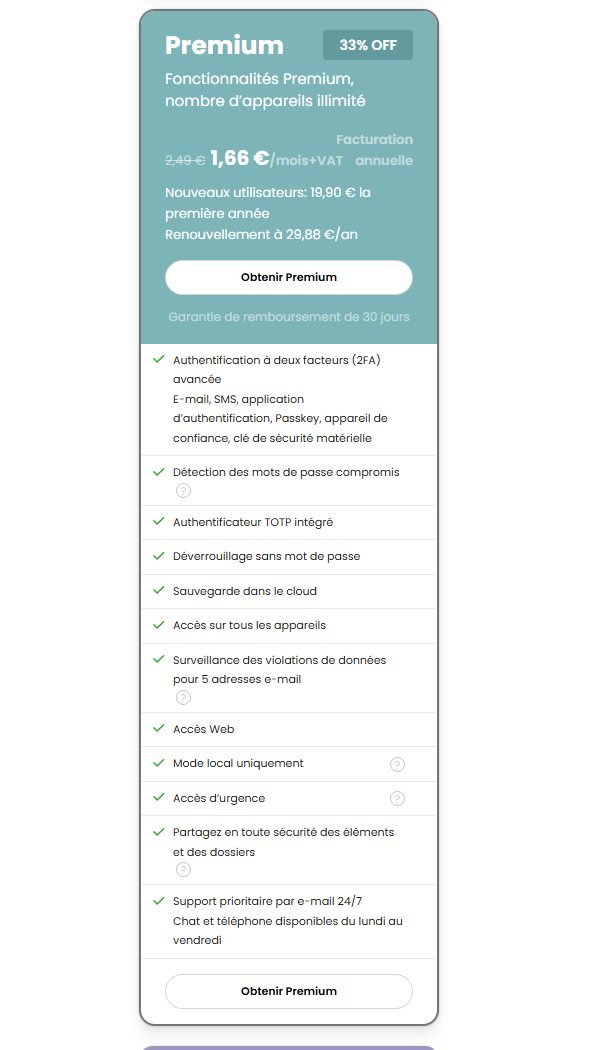
- A 33% promotion was announced until October 31. It covers new subscriptions only: renewal is at the regular price.
How much does RoboForm cost in 2026?
Here is what RoboForm’s French pricing page showed on October 25, 2026. Personal plans are priced in euros and shown excluding VAT (the Premium card carries the mention “/month+VAT”): the total at checkout is what counts. One detail worth knowing: seen from a US IP address, the same page shows the same amounts in dollars ($2.49, $29.88, $3.98, $47.75), which shows that the currency follows your location and that you should check the display from your own connection.
| Plan | Displayed price per month | Billing | Renewal | Accounts |
|---|---|---|---|---|
| Free | EUR 0 | none | none | 1, on a single device |
| Premium | EUR 2.49 | annual | EUR 29.88 per year | 1, unlimited devices |
| Family | EUR 3.98 | annual | EUR 47.75 per year | up to 5 Premium accounts |
| Business | $3.33 per user | annual | $39.95 per user per year | teams, free trial |
Four things to read in this table.
- Premium is billed annually. The “EUR 2.49 per month” is a presentation price: you pay EUR 29.88 at once, once a year, and that is also the renewal amount. Outside the promotion, the vendor does not show a gap between teaser price and renewal price here, which is rather clear.
- The promotion does create a gap. See the next section: the first year can cost less, the second goes back to the regular price.
- Family is the best price per person. EUR 47.75 per year for 5 Premium accounts is about EUR 9.55 per account (our calculation), against EUR 29.88 for an individual Premium.
- Business is not a personal plan. It is billed per user, in dollars on the French page, with a free trial. We say no more about it; for that plan the official RoboForm page is the only reliable reference, and we put no affiliate link on it.
The 30-day money-back guarantee
The page shows a 30-day money-back guarantee on Premium and Family. Details (first purchase only? payment method? procedure?) are not on the pricing page, and we found no terms page we can cite on the matter. Our advice is simple: if you subscribe, put a date in your calendar at day 25, and decide that day whether to keep the product, having tried importing your passwords and filling on your real accounts.
How much over several years?
Let us take simple calculations from the displayed prices, VAT aside. Over two years, Premium comes to EUR 59.76 at the regular price, or EUR 49.78 with the first-year promotion (EUR 19.90 then EUR 29.88). Over three years, EUR 89.64 at the regular price, or EUR 79.66 with the promotion. The promotion therefore changes the bill by about EUR 10, once, and it should not be your only criterion.
The current promotion: read on October 25, 2026
Observed on October 25, 2026, announced until October 31. That day, RoboForm’s pricing page displayed a banner saying “Save 33% on new RoboForm Premium subscriptions. The offer ends October 31” (translated from the French page). The amounts shown for new users:
- Premium: EUR 19.90 for the first year (shown as EUR 1.66 per month), then EUR 29.88 per year.
- Family: EUR 31.95 for the first year (shown as EUR 2.66 per month), then EUR 47.75 per year.
This section describes a dated reading: if you read this page after October 31, 2026, assume the offer is over until proven otherwise and check the official page. We found no Black Friday offer from RoboForm on October 25, 2026: the official page announced none. If one appears later, the vendor’s page will show it first. To see live offers: RoboForm’s official page. The calendar of VPN offers for the same period is in our guide VPN Black Friday 2026.
RoboForm Free: what the Free plan allows
The Free plan is shown at EUR 0 with the wording “unlimited passwords on a single device”. That limit shapes everything else: you can store as many logins as you like, but your vault is only usable on one device. According to the page read on October 25, 2026, the Free plan also includes:
- advanced two-factor authentication (email, SMS, authenticator app, passkey, trusted device, hardware security key);
- compromised password detection;
- a built-in TOTP authenticator, so you do not depend on a separate code app;
- passwordless unlock and cloud backup;
- email support, available 24 hours a day, 7 days a week.
The same page explicitly crosses out, in the Free plan, access on all devices, breach monitoring for 5 email addresses, web access, local-only mode, emergency access and secure sharing of items and folders. In other words, the free plan is a real vault for one device, not a trial of every feature.
What Premium adds, according to the same page: access on all devices, monitoring of 5 email addresses, web access, local-only mode, emergency access, secure sharing, priority support (email 24/7, plus chat and phone Monday to Friday) and the 30-day money-back guarantee. For a comparison with the free plans of Bitwarden, Proton Pass and NordPass, see the table in the alternatives section below.
What RoboForm does: features and platforms
RoboForm’s page lists the following for all plans (read October 25, 2026):
- Unlimited storage of passwords, with a change history and secure notes.
- Web form filling, including contact details and payment cards: see the next section.
- Password generator and password audit to spot weak or reused logins.
- Passkeys supported, and Windows application logins, a useful detail if you use desktop software with a login.
- AES-256 encryption, master password restoration, export and import, offline access.
- Multi-platform: RoboForm shows app store ratings on its October 25, 2026 page: 4.7 on the App Store (43.2k reviews), 4.6 on Google Play (32.7k), 4.5 on Chrome (3.6k) and 4.6 on Edge (657). These are figures displayed by RoboForm on its own page, which we did not check one by one in the stores.
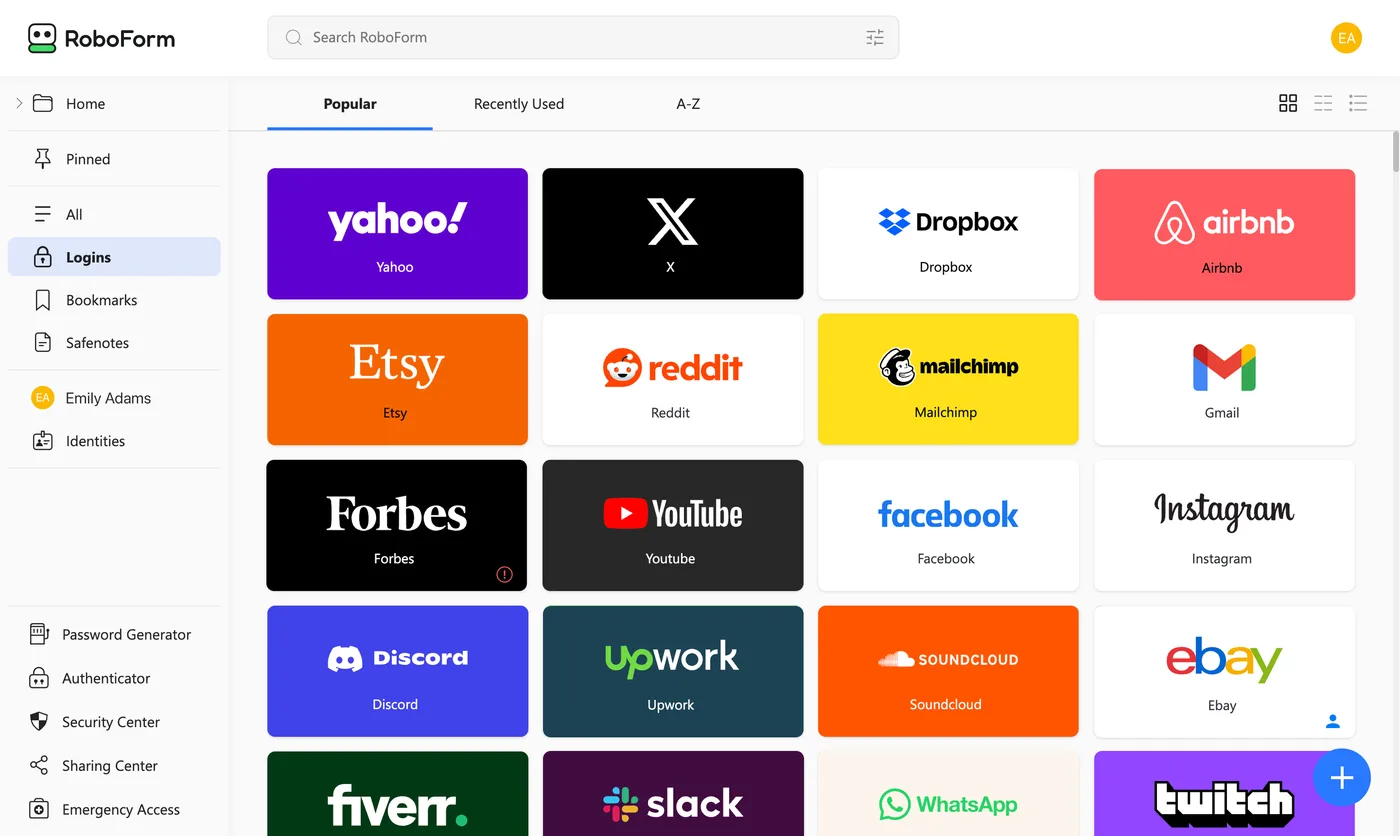
This screenshot from the vendor’s press kit shows the general layout: a left column (logins, bookmarks, secure notes, identities), tools at the bottom (password generator, authenticator, security center, sharing center, emergency access) and site tiles on the right. It is a visual supplied by RoboForm: it shows the interface, not real use with lived data. The interface also exists in dark mode.
The publisher and its history
RoboForm is published by Siber Systems, a company based in Fairfax, Virginia (United States), which dates its product to 1999. RoboForm’s page carries a 1999 to 2026 copyright. That longevity is an argument: the product has outlived several generations of browsers. It is not, by itself, proof of security, and we cite it as a historical landmark, not a guarantee.
Form filling, the historic strength
If RoboForm has one argument that sets it apart, this is it. Many managers fill a “username” field and a “password” field well, but are less at ease with an order form asking for a name, an address, a postcode, a phone number and a card. RoboForm built its reputation on that point, and its page lists it among the features of every plan: web form filling and identity management.
Concretely, the idea is to create an “identity” (yours, a relative’s, or a professional one) with its fields, then have it filled in with one click. For someone who orders online often, fills in administrative forms or regularly changes cards, the time saved can be real. Conversely, if you only use your manager for login credentials, this advantage barely concerns you, and you can choose on other criteria (price, open source, number of devices).
We must be honest about the limit of what we say here: we have not used RoboForm on real forms, and we cannot tell you whether it fills better or worse than a given competitor on a particular checkout site. What we can say: the feature is announced by the vendor, it is part of its historic reputation, and public reviews (Trustpilot, app stores, review sites) are where to check whether it keeps its promises on the sites you use. A practical tip if you decide to try it: start with the free plan or the guarantee period, and try three sites from your daily life, including a shopping site with an address form.
Is RoboForm safe?
What the vendor says
RoboForm’s official page states AES-256 encryption of data. It also lists, for all plans, master password restoration and data export and import, and for free and paid plans alike (see the previous section) advanced two-factor authentication with six methods (email, SMS, authenticator app, passkey, trusted device, hardware security key). The “local only” mode, reserved for paid plans according to the page, lets you keep your vault on your device without cloud sync, which not everyone offers.
What we cannot claim
On the pages read on October 25, 2026, we found no independent audit report we could cite with rigor. We do not say none exists: we say we have not seen one, and that we will not invent a certification or an audit firm to reassure you. We do not report any security incident we have not verified either. If this point is decisive for you, check the vendor’s security pages and recent specialist press yourself, and compare with competitors that publish their audits: Bitwarden publishes a list of security assessments, and Proton says Proton Pass has been audited (see our readings in the NordPass review).
Good habits, whatever the manager
- Choose a long, unique master password that you use nowhere else: a phrase of several words is easier to remember than a string of characters.
- Turn on two-factor authentication on the manager account. RoboForm includes it from the free plan.
- Keep browser extensions up to date and turn off autofill on sites you do not know.
- Note what master password restoration requires and keep it outside the vault, before you need it.
RoboForm limits, plainly
- The free plan is limited to a single device. It is not a hidden flaw (the page says so), but it is stricter than Bitwarden Free or Proton Pass Free.
- No independent audit we can cite. See the security section.
- The code is not presented as open. We found no published code on the pages read; if open source matters to you, Bitwarden is the reference.
- The first-year promotion does not last. EUR 19.90 then EUR 29.88: plan for the renewal date.
- Business prices are in dollars on the French page. If you manage a team, check the billing currency.
- Less press coverage in French. Search demand for “RoboForm avis” is low in France (a few dozen searches a month according to our keyword readings), so there are fewer recent comparisons to cross-check. One more reason to rely on the 30-day guarantee.
- We have not used the product. Our review is an analysis of public documents, not a hands-on report.
RoboForm alternatives
Here are the offers of six competitors, read on their official pages on October 25, 2026. Currencies vary with what each page displayed to us; when a page did not display its prices (dynamic rendering), we say so rather than quote without proof.
| RoboForm | NordPass | Proton Pass | Bitwarden | 1Password | Dashlane | Keeper | |
|---|---|---|---|---|---|---|---|
| Free | Yes, 1 device | Yes, no multi-device access | Yes, unlimited devices, 10 aliases | Yes, unlimited devices and passwords | No (14-day trial) | Not mentioned on the page read | Yes, 1 mobile device, 10 items |
| 1 person | EUR 2.49/month, billed EUR 29.88/year | EUR 1.39/month on 2 years (excl. VAT) | $2.99/month, billed $35.88 per year | $19.80/year ($1.65/month) | $3.99/month, promo $2.99 in year 1 | see the official page | see the official page |
| Family | EUR 3.98/month, 5 accounts | EUR 2.49/month, 6 accounts, on 2 years | $4.99/month, $59.88/year, 6 accounts | $47.88/year, 6 accounts | $5.99/month, promo $4.49, 5 members | see the official page | see the official page |
Sources and dates: see the Sources line at the bottom of the page, readings of October 25, 2026. The “1 person” prices of RoboForm, Proton Pass, Bitwarden and 1Password are billed annually; NordPass bills its lowest price over 2 years.
How to read this table:
- NordPass remains the cheapest on a 2-year commitment (EUR 37.53 for 27 months excluding VAT on October 25, 2026), but its free plan allows only one access at a time; see our NordPass review for the detail, including the undisclosed renewal price.
- Bitwarden is the reference for a generous free plan and open source, and offers self-hosting on some plans, according to its page.
- Proton Pass offers a free plan with no device limit and 10 masked email aliases, and a Proton Unlimited subscription bundling several Proton services.
- 1Password is the most expensive in the table, with a 14-day trial instead of a free plan, and a 25% first-year discount reserved for new customers buying on its site.
- Dashlane showed, on the page we read, Premium and Friends & Family plans (up to 10 members, unlimited devices and passwords) but no readable prices, hence “see the official page”.
- Keeper offers a very limited free plan (one mobile device, ten items) and its paid prices were not readable on the page read.
For the affiliate links in this table: see NordPass, see Proton Pass and see 1Password. Bitwarden, Dashlane and Keeper are not part of our programs.
RoboForm: who is it for?
RoboForm may suit you if:
- You often fill in forms (orders, paperwork, address changes) and want to save time with stored identities.
- You want a cheap manager for a household: the Family plan for 5 accounts comes to a little under EUR 10 per person per year (our calculation).
- You want to start free with a built-in authenticator and advanced two-factor authentication, on one device.
- You use Windows applications that ask for a login and want to cover them.
Look elsewhere if:
- You want open source, self-hosting or public audit reports: Bitwarden.
- You want a free plan with no device limit and masked email aliases: Proton Pass.
- You aim for the lowest price on 2 years and accept closed code: NordPass.
- You want a very polished interface and can pay more: 1Password.
To choose a master password, enable two-factor authentication and combine a manager with a VPN, see our comparison of managers.
What not to do
- Buy a “RoboForm premium” on a marketplace or a coupon site. Resold keys and shared accounts expose your vault, which holds the most sensitive things you own. Go through the official site.
- Stay on the free plan expecting two devices. The Free plan covers one.
- Take the promotion without noting the renewal date. Premium is EUR 29.88 per year after the first year.
- Turn off two-factor authentication on the account because the vault is encrypted anyway.
- Import all your passwords without sorting. Use the move to a new manager to delete unused accounts and replace weak or reused passwords, with the built-in password audit.
- Leave export files lying around. A plain-text password export must be deleted once the import is done, recycle bin included.
Verdict: what RoboForm is worth in 2026
- →Is RoboForm good? Yes for the essentials: an AES-256 encrypted vault, recognized form filling and low prices (EUR 2.49 per month for Premium on October 25, 2026).
- →And the free plan? It includes the authenticator and advanced two-factor authentication, but stays limited to one device, with no web access, breach monitoring or emergency access.
- →Is it safe? The vendor states AES-256 and rich two-factor authentication; we found no independent audit to cite, and we have not used it ourselves.
- →The main trap? The first-year promotion: EUR 19.90 then EUR 29.88. Note the renewal date.
- →Who should pick something else? People who want open source (Bitwarden), a multi-device free plan (Proton Pass, Bitwarden) or the lowest launch price (NordPass).
- →How to limit the risk? Use the 30-day guarantee to try import and form filling on your real accounts.
Sources (read October 25, 2026): RoboForm personal pricing (prices, plans, promotion, guarantee, store ratings) and RoboForm Business pricing ; NordPass pricing ; Bitwarden pricing ; Proton Pass pricing ; 1Password personal pricing ; Dashlane pricing ; Keeper personal plans. Some pages render their prices by script or by location: amounts we could not read are referred to the official page. Prices can change at any time.
See also: best password managers, NordPass review, NordVPN discount code, VPN savings hub.