Why a password manager is essential in 2026
Numbers that matter:
- Average user has ~100 online accounts in 2026
- 65% reuse the same password across multiple sites (source: 2024 cybersecurity reports)
- 81% of data breaches exploit weak or reused passwords
- A single password compromised in a leak = all your accounts using that password are compromised
The human problem: impossible to remember 100 strong, unique, 16+ character passwords. Result: reuse, weak variations (“MyPassword1”, “MyPassword2”), writing on post-its.
The solution: a password manager generates, stores, and auto-fills strong passwords. You only remember one master password.
A password manager generates and stores a strong, unique password for every account, so a single leak can't cascade - you only remember one master password.
- Our 2026 pick: NordPass (XChaCha20, built-in 2FA, breach scanner, €1.39/mo) - modern, cheapest, and it pairs naturally with NordVPN.
- RoboForm is the veteran to pick if you live in web forms (best auto-fill on the market).
- Best security stack: VPN + password manager + 2FA everywhere.
The criteria that matter in 2026
1. Zero-knowledge encryption
The manager itself can’t read your passwords. Everything is encrypted client-side with your master password — if someone hacks the manager’s servers, they get unusable encrypted blobs.
Expected algorithms:
- XChaCha20 (NordPass — most modern)
- AES-256 (RoboForm, 1Password, Bitwarden)
- Never proprietary unaudited algorithms
2. Independent security audit
Good managers publish third-party audits:
- NordPass: audited by Cure53
- RoboForm: independent audit not verified by us
3. 2FA on the master account
The manager account itself must be 2FA-protected:
- Authenticator app (Google Auth, Microsoft Auth, Authy)
- Physical YubiKey / Nitrokey (gold standard)
- Biometrics (Face ID, fingerprint) as complement
4. Multi-platform
Smooth sync between Windows, Mac, iOS, Android, Linux, browsers (Chrome, Firefox, Safari, Edge, Brave).
5. Secure sharing and family
Sharing a family Netflix password without sending it in clear = critical function:
- NordPass Family: 6 accounts, selective sharing
- RoboForm Family: up to 5 accounts
6. Dark web monitoring
Alert if your email/passwords appear in a data leak:
- NordPass Data Breach Scanner
- RoboForm Breach Check
NordPass — Our #1 recommendation
Score: 9.4/10
NordPass is developed by Nord Security (same house as NordVPN). Launched in 2019, it became a reference in 5 years through modern UX, aggressive pricing and state-of-the-art encryption.
Strengths
- XChaCha20 encryption — more modern and faster than AES-256
- Among the lowest prices on the market: €1.39/month on 2-year plan
- Built-in 2FA: TOTP storage in the same app
- Data Breach Scanner — alerts on compromise
- Password Health — detects weak, reused, old passwords
- Native apps: Windows, Mac, Linux, iOS, Android + browser extensions
- Family secure sharing (Family plan)
- Offline mode: vault access without Internet
- Regular Cure53 audit
Weaknesses
- Less advanced form-filling than RoboForm (complex forms, multiple addresses)
- Free “Password History” feature limited
Price
- Premium (1 user): €1.39/month on 2-year plan (~€33 for 2 years)
- Family (6 users): €2.49/month on 2-year plan — best family value
- Business: available for teams
RoboForm — The reliable veteran
Score: 9.1/10
RoboForm has been around since 1999 — one of the very first password managers. It has evolved but keeps its DNA: the best form-filling on the market, valuable to automate administration, forms, multiple addresses.
Strengths
- Exceptional form-filling: auto-fill of addresses, profiles, complex admin forms
- 26 years of experience — no major security incidents
- AES-256 encryption client-side
- Robust offline mode
- Local backup possible (total control)
- Windows, Mac, Linux, iOS, Android apps + all browser extensions
- Secure sharing up to 5 accounts (RoboForm Everywhere Family)
Weaknesses
- Less modern UX than NordPass (more dated design)
- No native Data Breach Scanner (need third-party service)
- Price slightly higher than NordPass
Price
- RoboForm Everywhere (1 user):
€24/year (€2/month) - RoboForm Family (5 users): ~€48/year
- RoboForm Free: free with limited sync
Proton Pass — The Swiss privacy alternative
Proton Pass comes from the Proton ecosystem (Proton Mail, Proton VPN), the Swiss company known for its privacy-first stance. What sets it apart:
- Open source and audited, Swiss jurisdiction
- Built-in email aliases (hide-my-email via SimpleLogin): every site gets a unique throwaway address, your real one never leaks
- Generous free tier: unlimited passwords and devices on the free plan
- Natural fit if you already use Proton VPN or Proton Mail
Limits: a younger product (2023) than NordPass or RoboForm, more basic form-filling. Plus plan pricing: around €2/mo (observed prices vary with promos, check at purchase).
pCloud Pass — The one-time-payment option
pCloud Pass comes from pCloud (Swiss cloud storage). Its singularity in a subscription-heavy market: a lifetime licence with a one-time payment, consistent with pCloud’s lifetime philosophy.
- Zero-knowledge encryption, Swiss jurisdiction
- Lifetime offer: pay once, keep forever (unique among the well-known managers)
- pCloud synergy if you already use their storage
Limits: a more confidential ecosystem, fewer long-term reviews than the veterans. Worth considering mainly if yet another monthly subscription puts you off.
1Password: the polished, pricier option
1Password is a paid manager with no free plan: the vendor offers a 14-day free trial, no credit card required. Our October 23, 2026 reading of 1password.com/fr/pricing (French page, euro prices):
- What the page lists: password generation, automatic saving and autofill, sharing items with anyone, use on all your devices, alerts for weak or compromised logins (Watchtower), developer tools. The FAQ also mentions a Secret Key and a travel mode. Storage: 1 GB per user.
- Family: the Families plan includes 5 users, unlimited shared vaults and simple admin controls.
- What we did not find: the pricing page does not detail a published audit or the code licence, so we do not claim either.
Pricing (read on October 23, 2026)
| Plan | Price shown to a new customer | Regular price | Monthly billing |
|---|---|---|---|
| Individual (1 user) | EUR 2.74/month for the first year (EUR 32.88 over 12 months) | EUR 3.65/month | EUR 4.39/month |
| Families (5 users) | EUR 4.31/month for the first year (EUR 51.72 over 12 months) | EUR 5.75/month | EUR 6.99/month |
Euro prices are for annual billing, except the last column. In dollars, the FAQ on the same page gives $2.99 (Individual) and $4.49 (Families) per month during the promotion, against $3.99 and $5.99 at the regular price. 12-month totals are our calculations.
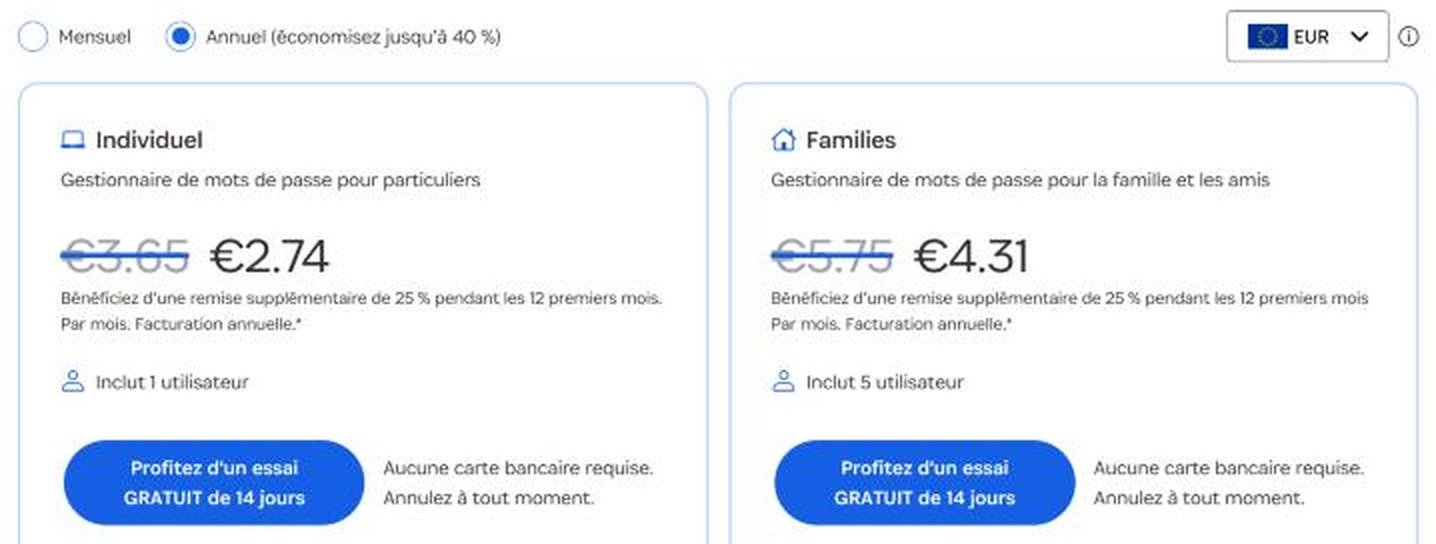
This is not a Black Friday offer. The page does not mention Black Friday: it is the 25% first-year discount for new customers who subscribe directly on 1password.com (not through the App Store or Google Play) with annual billing. 1Password calls it a “current promotion” and we cannot guarantee how long it lasts; we saw it unchanged on October 18, 2026. After the first year, expect the regular price: EUR 3.65 per month for Individual, about EUR 43.80 per year (our calculation).
Weak points
- No free plan: only the 14-day trial.
- Pricier than NordPass: EUR 2.74 the first year then EUR 3.65, against EUR 1.39 per month for NordPass on 2 years.
- Discount limited to new customers and the first year.
Who is it for? People who prefer a very polished interface and accept paying more, or who want a family plan with unlimited shared vaults.
Try 1Password free for 14 days (affiliate link)
Direct comparison NordPass vs RoboForm
| Criterion | NordPass | RoboForm |
|---|---|---|
| Encryption | XChaCha20 | AES-256 |
| 1-user price | €1.39/mo | €2/mo |
| Family price | €2.49/mo (6) | €4/mo (5) |
| Built-in 2FA | Yes | Yes |
| Advanced form-fill | Standard | Excellent |
| Breach scanner | Built-in | Third-party |
| Offline | Yes | Yes |
| Platforms | All | All |
| UX | Modern | Classic |
| Independent audit | Cure53 | not verified |
| Market experience | 2019 | 1999 |
| Guarantee | 30 days | 30 days |
Verdict: NordPass for 90% of users (price + UX + modern features). RoboForm if you’re a form-filling power user or need an ultra-proven product.
How to pick a good master password
Your master password = the only one you remember manually. It protects everything else.
Rules
- At least 20 characters
- Random words (not personal phrases easy to guess)
- Unique — never used anywhere else
- Memorizable via method: phrase mapped through a personal “cipher”
Good method example (Diceware 4-5 words):
correct-horse-battery-staple-bananaVery strong (40+ entropy), memorable (mental image).
NEVER
- Use your name, date of birth, child/pet name
- Common variations (“Password123!”, “Azerty1234”)
- A password used elsewhere (even partially)
Combining VPN + Password Manager: the 2026 stack
Why the duo is optimal
| Threat | VPN Protection | Password Manager Protection |
|---|---|---|
| Phishing (fake site) | Partial (Threat Protection blocks some) | Auto-fill won’t fill on fake sites |
| Site data breach | No | Alert + fast rotation |
| Public Wi-Fi MITM | Encryption | No |
| Brute force account | No | Strong passwords |
| Reuse | No | Unique passwords |
| ISP surveillance | Encryption | No |
| Geo-blocking | Regional IP | No |
| IP leak | Masking | No |
Both are complementary, not redundant.
Recommended stack
Optimal budget (€4.90/month):
- NordVPN — €3.49/mo (6,500 servers, Threat Protection, Panama)
- NordPass — €1.39/mo (XChaCha20, 2FA, breach scanner)
Robust alternative (~€5.50/month):
- NordVPN — €3.49/mo
- RoboForm Everywhere — ~€2/mo (form-filling, offline, 26 years)
Family stack (~€4.70/month for 6 people):
- Surfshark — €2.19/mo (unlimited connections)
- NordPass Family — €2.49/mo (6 accounts)
- That’s ~€1/month per person for family VPN + password manager
What NOT to do
- Store your passwords in Excel, Word or Notes — unencrypted, exposed
- Use the browser’s built-in manager for critical accounts — less secure, no master 2FA
- Forget your master password — you lose EVERYTHING (zero-knowledge = no recovery)
- Share your master account — each person should have their own
- Skip 2FA on master account — if master falls, everything falls
- Buy a “cracked LastPass premium” on dodgy sites — compromised account by definition
Verdict: which password manager in 2026
- →Why bother? It is the cheapest big upgrade you can make to your online security.
- →For 90% of users? NordPass at €1.39/mo: best price/value, modern UX, perfect synergy with NordVPN.
- →Form-filling power user? RoboForm, a proven veteran with unbeatable auto-fill.
- →Privacy first, or already on Proton? Proton Pass: open source, Swiss, built-in email aliases, generous free tier.
- →Very polished interface, bigger budget? 1Password, no free plan but a 14-day trial.
- →Allergic to subscriptions? pCloud Pass and its one-time lifetime licence.
- →And to cover every angle? Combine it with a VPN.
See also: our full VPN comparison and the VPN savings hub.