RoboForm Free: the limit that matters is the device
The answer fits in one sentence, which RoboForm displays itself on its page: the Free plan offers unlimited passwords on a single device. The rest of this article is a way of answering the question that sentence raises: is that enough for you? For a desktop computer and a handful of accounts, probably yes. For someone who moves from phone to computer several times a day, no, and the free plans of Bitwarden or Proton Pass do better on that point. This page details what the free plan includes and excludes, when to move to Premium, and what competitors offer for free. For paid prices, security and the rest of the product, our full RoboForm review is the reference page.
Analysis based on the official pages of RoboForm and competing vendors read on October 25, 2026, their help centers and public reviews; we have not used RoboForm ourselves. Offers change: the vendor's page is the reference. This page contains affiliate links.
RoboForm's free plan is a real vault with real two-factor authentication, but it only works on one device. Checked October 25, 2026.
- EUR 0, unlimited passwords, one device. No access on all devices, no web access, no sharing.
- Included from the free plan: advanced two-factor authentication, TOTP authenticator, compromised password detection, cloud backup, email support.
- If you have several devices and no budget, look at Bitwarden Free or Proton Pass Free, with no device limit.
What the RoboForm free plan includes
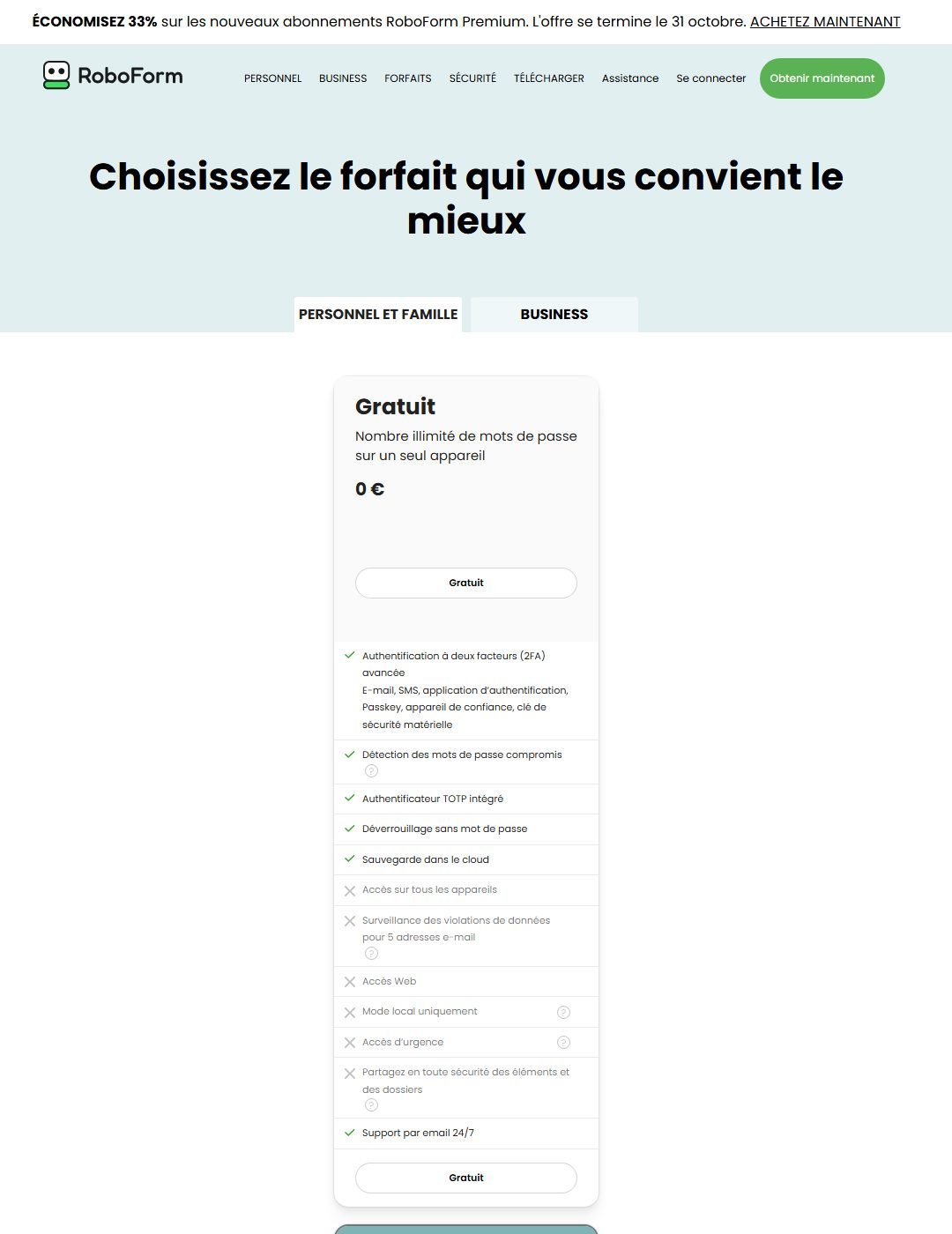
The Free plan card on the French pricing page (read October 25, 2026) shows EUR 0 and the wording “unlimited passwords on a single device”. Below it, the list of ticked features:
- Advanced two-factor authentication, with six methods cited: email, SMS, authenticator app, passkey, trusted device and hardware security key.
- Compromised password detection.
- Built-in TOTP authenticator: the one-time codes of your other accounts can live in the same tool, saving you one more app.
- Passwordless unlock and cloud backup.
- Email support 24/7.
On top of each plan’s own list, RoboForm indicates features common to “all plans”: unlimited storage, web form filling, password audit, password generator, AES-256 encryption, master password restoration, export and import, history, passkeys, secure notes and Windows application logins. The detail of those features is in our RoboForm review.
What is not included in the free plan
This is where the screenshot above speaks loudest, because it shows the crosses. According to the same page, the Free plan does not include:
- access on all devices: one device only, which is the main constraint;
- breach monitoring for 5 email addresses: the alert if your addresses appear in a known leak is reserved for Premium;
- web access: no looking up your vault from a browser on a borrowed computer;
- “local only” mode: if you wanted to keep your data without cloud sync, that is a paid feature;
- emergency access: naming a relative who could open your vault under certain conditions;
- secure sharing of items and folders.
Some of these absences are logical (sharing makes little sense on a single device), others are a real commercial choice, like breach monitoring. Note that email support is present in the free plan, while priority support (email 24/7, chat and phone Monday to Friday) is reserved for Premium.
One device: what it looks like day to day
Saying “one device” is abstract. Here are three concrete situations to judge whether it suits you.
Scenario 1: you mostly use a computer. You shop online, do your paperwork and read your mail from the same PC. Your phone is for calls and a few apps you log into once and for all. The free plan fits: one vault, one device, two-factor authentication and compromised password alerts.
Scenario 2: you log in everywhere. You open accounts from your phone on the commute, from your computer at work, from a tablet in the evening. One device forces you to choose. The common outcome is to end up retyping passwords by hand on the other devices, which means giving up the manager’s protection exactly where it matters most. This is the case where you either move to Premium or change manager.
Scenario 3: you manage a household. Everyone has their own accounts, but some are shared (subscriptions, a joint bank account, family paperwork). The free plan includes neither sharing nor multiple accounts. RoboForm’s Family plan, shown at EUR 3.98 per month billed annually for up to 5 Premium accounts (renewal EUR 47.75 per year, on October 25, 2026), is built for this.
A method tip: before choosing, count your real devices. Put together personal computer, work computer (checking what your employer allows), phone, tablet. If the total is more than one, RoboForm’s free plan is a starting point, not a destination.
When to go Premium?
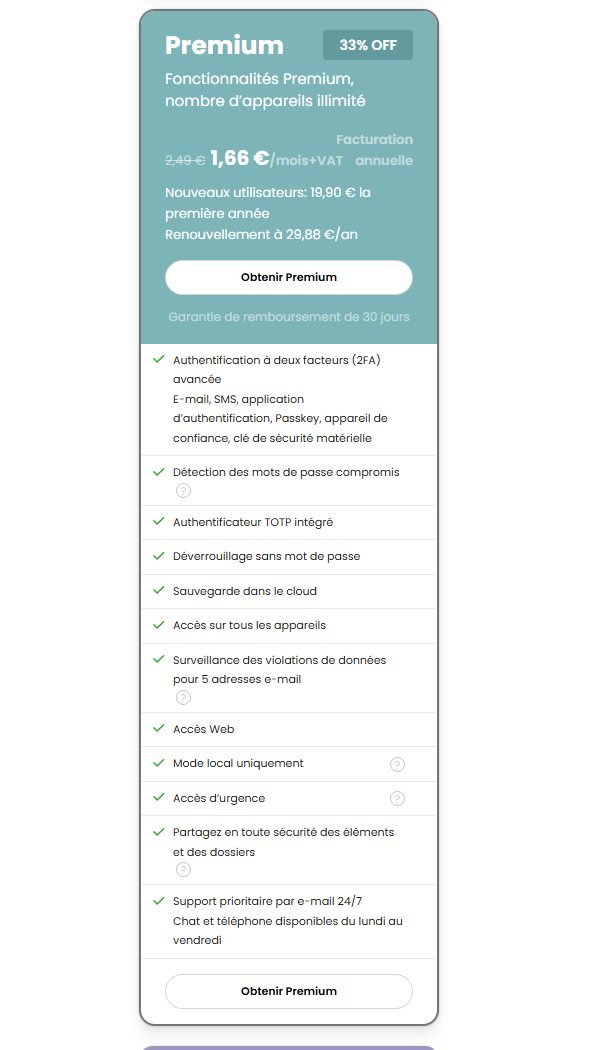
Premium was shown on October 25, 2026 at EUR 2.49 per month billed annually, that is EUR 29.88 per year at renewal, excluding VAT. A 33% promotion on new Premium subscriptions was announced until October 31, 2026: EUR 19.90 for the first year (shown as EUR 1.66 per month), going back to EUR 29.88 afterwards. That promotion is a dated reading, not a promise: check the official page on the day you read this.
The signals that justify taking the step:
- You need at least two devices. This is reason number one.
- You want to be alerted to leaks. Breach monitoring for 5 email addresses is not in the free plan.
- You want to share items with a relative, or name an emergency contact.
- You want a local-only vault, without cloud sync, or web access.
- You want chat or phone support Monday to Friday.
In the other direction, do not pay if you tick none of these boxes: the free plan then covers your needs. And if you tick the first box but have no need for what is specific to RoboForm (form filling, identities), compare prices with competitors: NordPass was shown at EUR 1.39 per month on 2 years (excluding VAT) on its French page of October 25, 2026, and Bitwarden Premium at $19.80 per year. Our NordPass review details those prices and what is unknown about renewal.
The 30-day guarantee as a trial period
RoboForm states a 30-day money-back guarantee on Premium and Family. It does not appear on the Free plan, which is normal since there is nothing to refund. The smart way to use it: start free on the device you use most, see whether the interface and filling suit you, then move to Premium only if you need multi-device. The exact refund conditions are not detailed on the pricing page: read them at checkout.
Free plans compared: RoboForm, Bitwarden, Proton Pass, NordPass, Keeper
Here is what each vendor displayed for its free offer, according to each official page read on October 25, 2026 unless otherwise noted.
| RoboForm Free | Bitwarden Free | Proton Pass Free | NordPass Free | Keeper Free | |
|---|---|---|---|---|---|
| Devices | 1 only | unlimited | unlimited | multi-device access not included on the page; one active session according to the help center (read October 18) | 1 mobile device |
| Passwords | unlimited | unlimited | unlimited logins, notes and cards | unlimited per the product page (read October 18) | 10 items (passwords or passkeys) |
| Built-in authenticator | Yes (TOTP) | listed in Premium according to the page | no, reserved for Pass Plus (“built-in 2FA”) | not included on the French page | storage of 2FA codes cited on the page |
| Other point | advanced two-factor authentication, compromised password detection | open source | 10 masked email aliases | autofill and secure storage | 2FA cited |
| Entry paid price | EUR 2.49/month billed EUR 29.88/year | $19.80/year | $2.99/month ($35.88 per year) | EUR 1.39/month on 2 years excl. VAT | see the official page |
A few remarks to read this table without error:
- It compares offers, not products used. We have not used any of these free plans for this article: we report what their pages display.
- The device limit is the deciding criterion. On that point, Bitwarden and Proton Pass are more generous than RoboForm, NordPass and Keeper.
- The free built-in authenticator is RoboForm’s asset. At Proton Pass, built-in two-factor authentication is in the paid plans; at Bitwarden, the built-in authenticator appears in Premium’s list.
- Keeper’s figures are limited. Ten items and a single mobile device: this is more a preview than a plan for daily use.
- Currencies. Depending on the page and location, prices are in euros, dollars or Swiss francs: always compare the final price in your country.
If your priority is open source and no device limit, Bitwarden and Proton Pass are the first to look at; for a wider ranking, including paid plans, see our managers guide. For Proton Pass, see the offer; for NordPass, see the offer (affiliate links). Bitwarden and Keeper are not part of our programs.
Free does not mean less protected
A common idea is that a free plan is less secure than a paid one. According to RoboForm’s page, that is not the product’s logic: AES-256 encryption is listed for all plans, and advanced two-factor authentication is ticked from the free tier. What changes between free and paid is services (multi-device, breach monitoring, sharing, emergency access), not how the vault is encrypted.
That said, a protected vault is still subject to your own habits. A few rules that matter far more than the choice of plan:
- A long, unique master password. A phrase of four or five unrelated words beats a string of symbols you will forget. RoboForm states a master password restoration: read how it works before you need it.
- Two-factor authentication on the manager account. It is included from the free plan, so there is no reason to skip it.
- A backup of your data. Export is listed among the features of all plans: make one from time to time, stored somewhere encrypted, and delete plain copies.
- An up-to-date device. A manager does not protect against a compromised computer: system and browser updates, and no unknown extensions.
On audits and vendor transparency, we refer to the security section of our RoboForm review: we found no independent audit to cite, and we do not want to invent one.
RoboForm Free: who is it for?
The free plan suits you if:
- You only use one device for your important accounts.
- You want to try the product without paying before deciding on Premium or Family.
- You want a built-in TOTP authenticator and advanced two-factor authentication at no cost.
- You are leaving passwords saved in the browser and want a simple first step toward a real manager.
Pick something else if:
- You want your passwords on several devices without paying: Bitwarden Free or Proton Pass Free.
- You want open source: Bitwarden.
- You want built-in masked email aliases: Proton Pass.
- You are a family and want a low price per person: RoboForm’s Family plan at EUR 3.98 per month (5 accounts), or NordPass’s (6 accounts, EUR 2.49 per month on 2 years excluding VAT on October 25, 2026).
What not to do
- Assume the free plan covers two devices. One device is the stated rule.
- Look for a “free RoboForm premium” or a bargain key. Resold keys and shared accounts expose your vault. The only reliable offers are those on the official page.
- Keep passwords in an unencrypted file “for now”. A plain-text export must be deleted as soon as the import is done, recycle bin included.
- Rush into the promotion without noting the renewal. Premium is EUR 29.88 per year after the first year.
- Import without sorting. Use the arrival in a new manager to delete unused accounts and change reused passwords.
Verdict: RoboForm Free in 2026
- →Is it really free? Yes, EUR 0 on the October 25, 2026 page, with no time limit mentioned.
- →What is the limit? One device. No access on all devices, no web access, no sharing, no breach monitoring.
- →What do you get? Unlimited passwords, advanced two-factor authentication, a built-in TOTP authenticator and email support.
- →When to pay? As soon as you need a second device, breach monitoring or sharing.
- →And if I want multi-device free? Bitwarden Free or Proton Pass Free.
- →How to limit the risk? Start free, then use the 30-day guarantee if you move to Premium.
Sources (read October 25, 2026 unless noted): RoboForm personal pricing (Free, Premium, Family, promotion, guarantee) ; Bitwarden pricing ; Proton Pass pricing ; NordPass pricing and NordPass help center, Premium vs Free (read October 18, 2026) ; Keeper personal plans. Offers can change at any time.
See also: RoboForm review, NordPass review, best password managers, VPN savings hub.