Information taken from PureVPN's official pricing and refund pages, checked on October 25, 2026. This page contains affiliate links.
PureVPN free trial: the short answer
If you search for “PureVPN free trial”, you will find pages promising a week for free, a $0.99 trial or “30 days for nothing”. What PureVPN’s own pages show on October 25, 2026 is simpler: paid plans, and a 31-day money-back guarantee. You pay first, use the service, and can ask for your money back within 31 days if it does not suit you.
That works as a trial, with one difference you should keep in mind: you front the price of a plan. This guide explains how much, who is covered, what is excluded, and how to run a proper 31-day test so the guarantee is worth something.
PureVPN has no free plan. What exists is a 31-day money-back guarantee, one day longer than the 30 days most VPNs offer.
- Refund requests go by email to help@purevpn.com, with your username and the reason.
- Not covered: renewals, and payments made through Google Play, the Apple App Store or Coinpayments.
- Nothing to pay upfront: Proton VPN Free, no credit card, but more limited.
See the PureVPN offer → 31-day money-back guarantee, according to the official refund policy.
Free trial or money-back guarantee: the difference that matters
A classic free trial asks nothing of you at the start: you open an account, try the service, and if you do nothing, it stops. A money-back guarantee works the other way round: you pay first, use the service, and ask for a refund if you change your mind within the window.
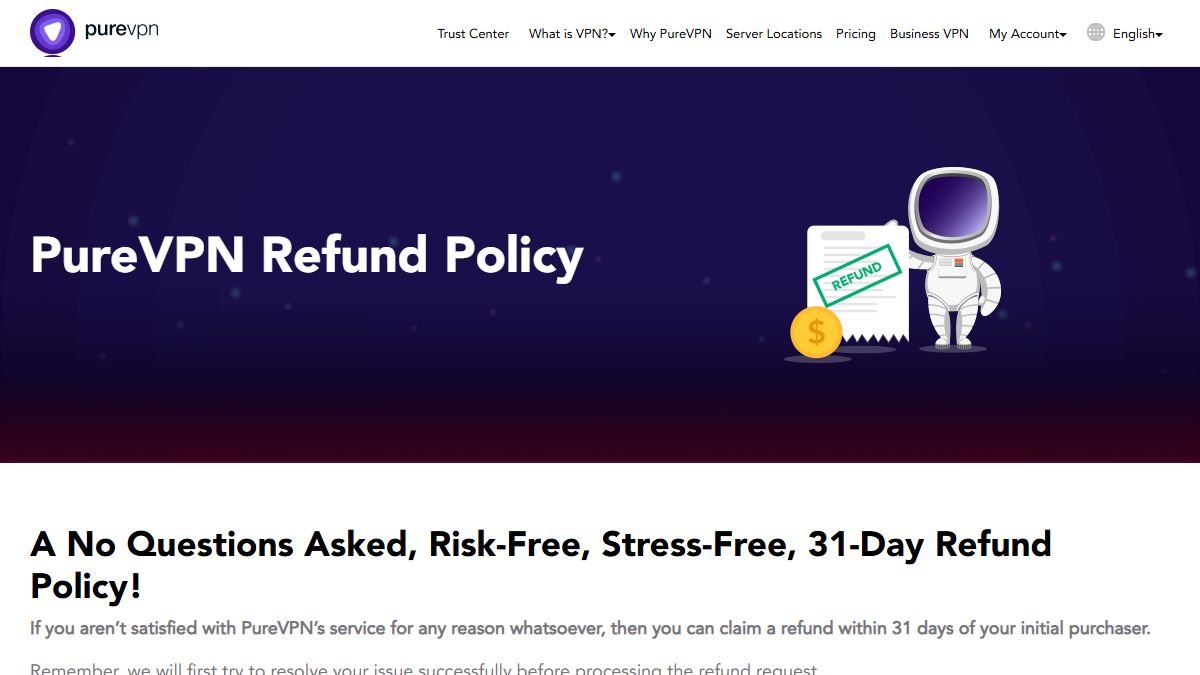
With PureVPN you are in the second case. The refund page is titled “A No Questions Asked, Risk-Free, Stress-Free, 31-Day Refund Policy” and says you can claim a refund within 31 days of your initial purchase if you are not satisfied “for any reason whatsoever”.
The flip side is that the money leaves your account at the start. For a short test, that is the real cost of the guarantee: a few weeks of waiting for the refund to land, in the best case.
What the official refund policy says
We read the page on October 25, 2026. These are its points, in plain words:
- Window: 31 days from the initial purchase.
- Reason: any reason. PureVPN says it will first try to solve your issue before it processes the refund.
- How to ask: email help@purevpn.com with your VPN username and the reason.
- Speed: a valid request is processed within 24 hours. The money can take up to 30 days to appear, depending on your bank, card or payment provider.
- Renewals: the 31-day policy does not cover renewal payments, and renewals that follow a trial are not refundable.
- Excluded payments: purchases made through Coinpayments, the Google Play Store or the Apple App Store do not support the refund option and are marked non-refundable at checkout.
- Excluded accounts: accounts issued for special purposes.
Two details deserve a comment. The “no questions asked” title and the sentence about trying to resolve your issue first do not contradict each other, but expect a support agent to ask what went wrong before refunding. And the page does not say how the 31 days apply to a monthly plan, so if you plan to test on a monthly subscription, ask support first.
How much do you have to front to use the guarantee?
The price depends on your country, your currency and the current promotion. On the French pricing page (purevpn.fr), opened on November 8, 2026, the plans were shown in euros with the Black Friday promotion, the Standard plan over 5 years:
| Plan | Price per month | Total for the first term | Renewal per year |
|---|---|---|---|
| Standard | €1.51 | €90.57 (60 months) | €41.10 |
| Plus | €2.40 | see the price | see the price |
| Max | €3.02 | see the price | see the price |
Source: PureVPN pricing page in French, checked on November 8, 2026. Prices change with promotions: always check on the site before buying.
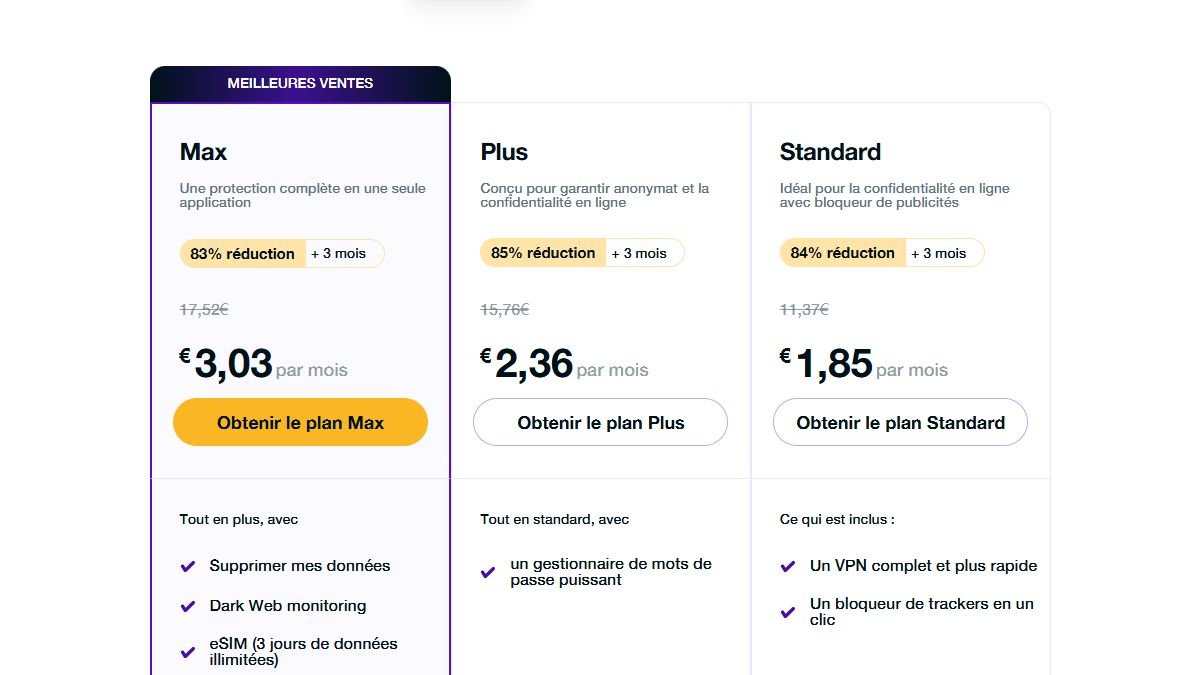
For a test, this means you front about €91 with the 5-year Standard plan, which comes back if you request a refund within 31 days. It is the cheapest per month, and also the one that commits you the longest, so keep the refund deadline in your calendar. If you decide to stay, note the renewal amounts above: the low headline price applies to the first period only.
Using the 31 days, step by step
- Buy on PureVPN’s website, not through an app store. App store payments are excluded from the refund policy. You can go through our PureVPN partner link, which leads to the official site.
- Pay with a card or another supported method, not Coinpayments.
- Note the date and time of your order and write down day 28 as your personal deadline. The page says 31 days, but a margin avoids arguing over hours.
- Turn off auto-renewal in your account if you only want to test, then renew by hand if you decide to stay.
- Test properly (see the checklist below), on the devices and for the services you really care about.
- Decide before the deadline. If you are not convinced, email help@purevpn.com with your username and the reason. Keep a copy of the message and the date.
- Follow the money. The refund can take up to 30 days to appear. If nothing arrives after a month, contact your bank with the date of the request.
The traps to know about before you start
Buying in the app. This is the costliest trap. A subscription billed by Apple or Google is outside PureVPN’s refund policy, and a refund then depends on those companies.
Thinking a trial can be refunded after it renews. The page says renewals following a trial are non-refundable. If you ever start a promotional trial, set a reminder before it ends.
Paying in crypto and expecting a refund. Coinpayments is on the excluded list. If a refund matters to you, use a card.
Missing the deadline by a few hours. Do not count in “months”: count 31 days from the order and act well before.
Trusting “free account” pages. Shared accounts and cracked keys expose your data and put you on the wrong side of the rules. Stick to the official offers.
Expecting a VPN to do what it does not do. A VPN encrypts your connection and hides your IP address from the sites you visit. It does not make you anonymous, and it does not make legal what is not. Use it within the law and the terms of the services you access.
What to test during the 31 days
Random use will not tell you much. A short plan will.
- Day-to-day speed. Run a speed test without the VPN, then with it, at the same time of day, on the suggested server and on a distant one. Results depend on your provider and your location.
- The services you use. If you want to watch your own subscriptions while travelling, test them from the country concerned. No VPN guarantees access to a given platform, and services can block VPNs at any time. Our PureVPN review describes the app and the streaming angle.
- The devices. Check that the app behaves on every device you own. PureVPN advertises 10 simultaneous connections.
- Support. Ask the chat a real question, for example about the refund procedure, to see the quality of the answer before you need it.
- The extras of the plan. Plus and Max add a password manager, data removal, dark web monitoring and an eSIM data pack. Test only what you would actually use.
At the end of the 31 days, ask yourself: did I use it without thinking about it, and did it do what I bought it for? If yes, keep it and check the renewal price. If not, request the refund before your deadline.
If you really do not want to front anything
Proton VPN Free is the most recommendable free offer: no credit card, no data cap announced, but a restricted choice of countries and lower speeds than paid plans. See our guide to Proton VPN free.
The guarantees of the other big VPNs work the same way. Our guide to the NordVPN free trial and the ExpressVPN free trial describe the procedure at those competitors, both with 30-day guarantees.
- 31-day money-back guarantee
- 10 simultaneous devices
- Standard 5-year plan at €1.51/month
- Free, no credit card
- No data cap announced
- Reduced choice of servers
- 30-day money-back guarantee
- Several plans, from Basic to Ultimate
- Trial possible on some mobiles
What NOT to do
- Buy inside the app if you are counting on the guarantee: Google Play and App Store purchases are excluded.
- Look for a “free PureVPN account” or a cracked key: shared accounts, risks to your data, no guarantee.
- Pay with Coinpayments and expect a refund: it is on the excluded list.
- Wait until the last day to ask: keep a margin of a few days.
- Assume a specific service will work: test with your own subscription before the 31 days end.
Verdict: a guarantee, not a free trial, and a fair one
PureVPN offers no free plan, but its 31-day refund policy does the job of a trial if you use it carefully: buy on the website, pay by card, turn off auto-renewal, test for what you really need, and ask by email before your own deadline. The guarantee is a day longer than the usual 30 days, though the refund can take up to a month to reach you, and renewals are never covered.
If the price is your main concern, the Standard 5-year plan at €1.51 per month (seen on November 8, 2026) is among the lowest we see on public pages, and the PureVPN review tells you where it is weaker than the leaders. If you would rather not front anything, start with Proton VPN Free and upgrade only if you hit its limits.