Our ranking
NordVPN #1 pick · Black Friday
Fastest VPN thanks to the NordLynx protocol · No-log policy audited three times
Proton VPN Black Friday 75% off
Fully open-source, audited apps · Swiss jurisdiction (outside 14 Eyes)
ExpressVPN Black Friday
In-house Lightway protocol, very fast · TrustedServer: RAM-only servers
Surfshark Best value
Unlimited simultaneous connections · Best value for money on the market
| VPN | Rating | Price/month | Servers | Devices | Refund | Offer |
|---|---|---|---|---|---|---|
| NordVPN | 9.6/10 | 2,99 €/mo | 9 200+ | 10 devices | 30 d. | See |
| Proton VPN | 9.2/10 | 2,49 €/mo | 20 000+ | 10 devices | 30 d. | See |
| ExpressVPN | 9.1/10 | 2,39 €/mo | 3 000+ | 10 devices | 30 d. | See |
| Surfshark | 9.0/10 | 2,49 €/mo | 4 500+ | Unlimited | 30 d. | See |
A VPN for ChatGPT: useful, but not for the reason you think
Many pages promise “the best VPN for ChatGPT” as if OpenAI’s tool needed a VPN to work. In most countries it does not. ChatGPT works fine without a VPN, and a VPN does not make your conversations anonymous. What it really does is more modest and still useful: it encrypts your traffic on a network you do not control, hides your IP address from your internet provider and the local network, and helps keep a stable connection while you travel.
So this page does three things. It explains what a VPN changes and does not change for ChatGPT and other AI tools, it summarizes what OpenAI’s rules say (without ever promising to get around anything), and it compares the VPNs that work well with these services. Prices and figures come from the official pages as of November 8, 2026, during the Black Friday period: they move, so always check the provider’s own site.
ChatGPT does not require a VPN in supported countries. A VPN protects your connection (public Wi-Fi, internet provider), not the content of your conversations or your account.
- For conversation privacy, ChatGPT's own settings matter (turn off model improvement, use Temporary Chat), not the VPN.
- OpenAI publishes a list of supported countries and warns that access from an unlisted country may lead to a blocked or suspended account. We recommend no workaround.
- Our picks: NordVPN (most complete), Proton VPN (privacy, free plan), ExpressVPN (simplest), Surfshark (unlimited devices).
Do you need a VPN to use ChatGPT?
No, as long as you are in a country OpenAI supports. The United States, the United Kingdom, Canada, France, Belgium and Switzerland, for example, are all on the official list. In those countries ChatGPT opens in the browser or the app, and exchanges between your device and OpenAI’s servers already travel over an encrypted HTTPS connection, like any serious website.
A VPN is therefore not a prerequisite. It is a network protection tool. It becomes relevant in specific situations:
- You use ChatGPT on public Wi-Fi (hotel, station, cafe, airport) and want an extra layer of encryption, especially for the other apps running at the same time. Our detailed guide: VPN and public Wi-Fi.
- You do not want your internet provider or your company network to see which services you visit. The VPN hides the destination from them, not the fact that you use a VPN.
- You travel and want a stable connection with the same security profile as at home.
- You use one VPN for the whole household, and ChatGPT is just one use among many.
If your only motivation is “protect what I write to ChatGPT”, a VPN is not the right answer. The next section explains why.
What a VPN really changes, and what it does not
A VPN creates an encrypted tunnel between your device and one of the provider’s servers. For the site you visit, your IP address becomes that of the server. That is all, and for some uses it is already a lot. But you need to separate what is changed from what is not.
What the VPN changes
- Your visible IP address for ChatGPT and third-party sites: it becomes the VPN server’s, not your home connection’s.
- What your local network sees: on hotel Wi-Fi, the network operator no longer sees the detail of your traffic, only that an encrypted tunnel is open.
- What your internet provider sees: it no longer sees the sites you visit, only the connection to the VPN.
- Your protection against interception on an unsafe network (we detail the real risks in our article on public Wi-Fi).
What the VPN does not change
- Your identity on OpenAI’s side. You are signed in to your account: email address, possibly your name, subscription and payment method. The VPN touches none of that.
- The content of your conversations. They reach OpenAI the same way, with or without a VPN. What the service does with them depends on its rules and your settings, not on your IP address.
- What you type into your browser. Extensions, ad tracking, cookies and browser fingerprinting keep working. A VPN is not a tracker blocker, even if some include a DNS filter.
- The security of your device. An infected computer or a malicious extension remains a risk, VPN on or off.
Put simply: the VPN protects the pipe, not what flows through it once it reaches the recipient. That is why ChatGPT’s privacy settings matter more than any VPN.
Protecting your AI conversations: the right settings
OpenAI’s help page “Data controls in ChatGPT”, updated in early November 2026 at the time of our check, explains what you can control. This is where the privacy of your exchanges is decided.
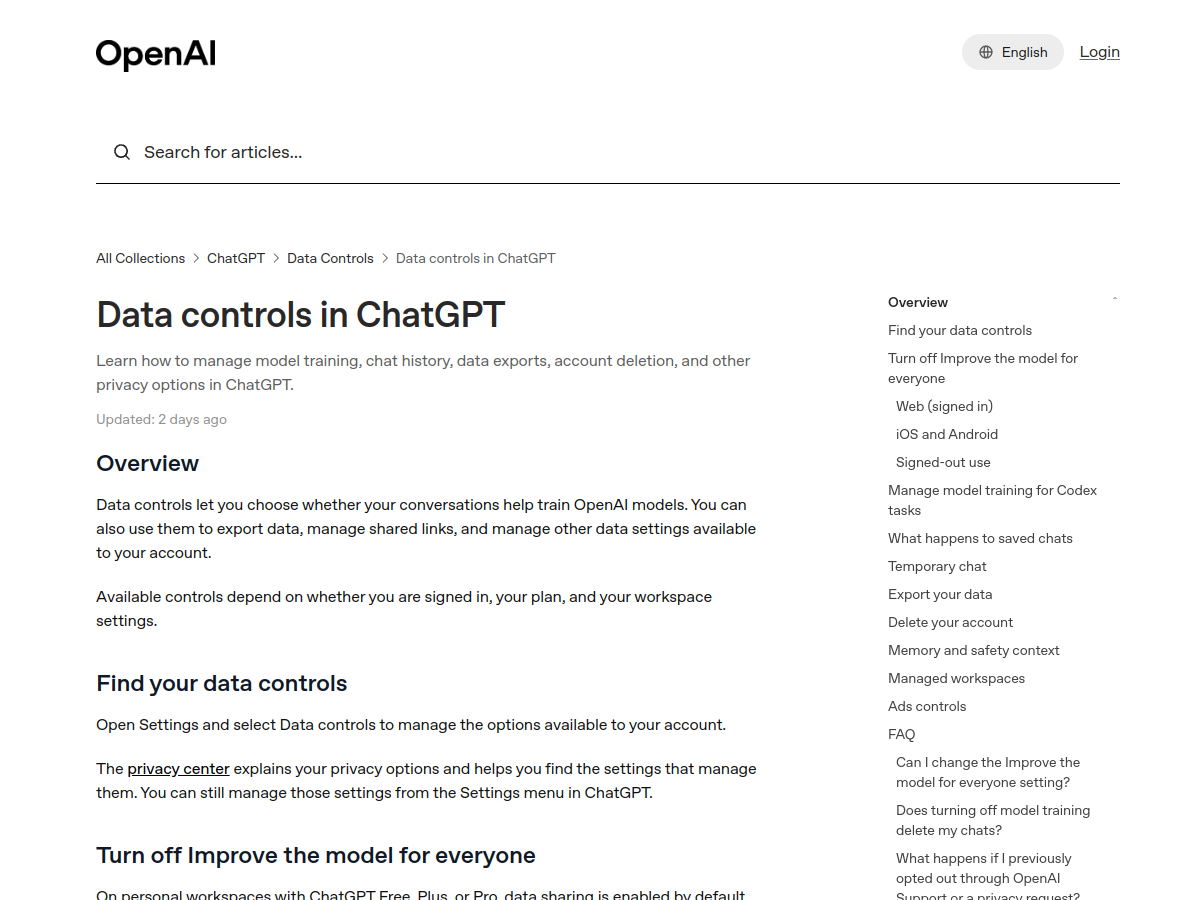
According to that page:
- Data sharing is on by default for personal accounts (Free, Plus and Pro plans), and you can turn off “Improve the model for everyone” while keeping your chat history.
- Temporary Chat lets you talk without the conversation being used to improve models or creating memories. Some conversations of this kind may be kept for up to 30 days for safety purposes, according to the same page.
- You can export your data and delete your account from the settings.
Our recommendations, in order of importance:
- Never enter data you would not want stored: passwords, card numbers, confidential company documents, named medical or legal files.
- Turn off model improvement if you do not want your conversations to contribute to training, and use Temporary Chat for sensitive topics.
- Separate uses: one account for work, another for personal use, if your employer’s rules and OpenAI’s allow it (sharing credentials between people is prohibited by the terms).
- Keep your device clean: updates, two-factor authentication on the account, a short list of browser extensions.
- Add a VPN if you are on a network you do not control. It is one more layer, not a substitute for the four points above.
Supported countries and OpenAI’s rules: what to know
OpenAI maintains a “ChatGPT Supported Countries” page listing the countries and territories from which the service is accessible. On November 8, 2026 the page showed a recent update (“17 days ago”).
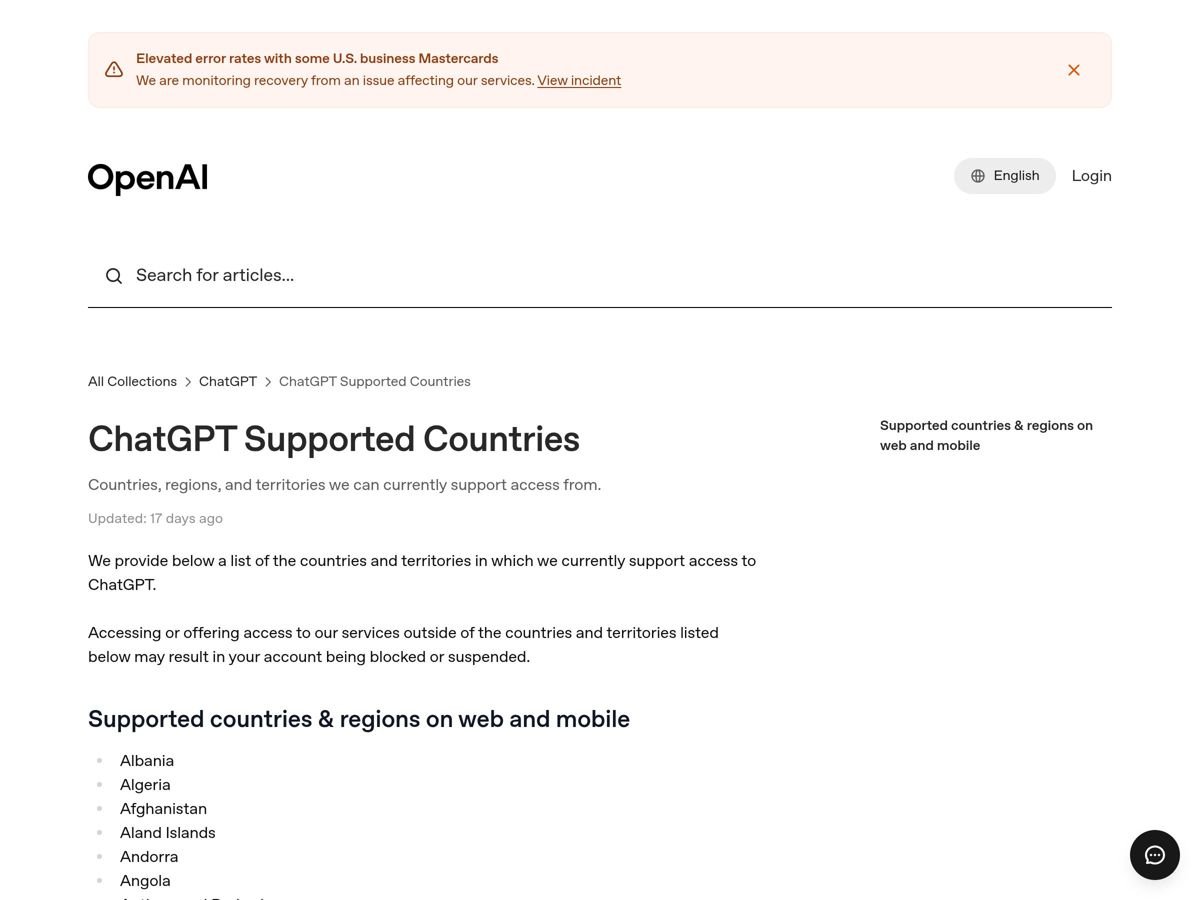
Three points come out of that page and the Terms of Use, and they matter to you:
- The page warns that accessing or offering access to the service outside the listed countries “may result in your account being blocked or suspended”. That risk is carried by the user, it is not a technical detail. The list does not include, for example, China, Russia, Iran, Cuba, North Korea or Syria.
- The Terms of Use (Europe version, updated January 16, 2026) do not mention VPNs, but they prohibit interfering with the service, including “circumventing any rate limits or restrictions or bypassing any protective measures or safety mitigations”. They also say the service cannot be used in a country under a US embargo, forbid sharing your account with someone else, and let OpenAI suspend an account.
- In some countries, using a VPN is itself restricted or illegal under local law. A blocked account is then not the only risk.
Our position, without ambiguity: we do not explain how to use a VPN to reach ChatGPT from a country where it is not available, and we do not promise that a VPN will “unblock” anything. It puts your account at risk, sometimes a paid subscription, and depending on the country, yourself. The VPNs on this page are recommended for the security of your connection and for keeping normal access when you travel between supported countries.
If you live in an unsupported country, check OpenAI’s official page for changes to the list, and favor services that are officially available where you are.
How we chose the VPNs for ChatGPT and AI use
We kept the criteria that matter to someone using an AI tool from a computer or phone:
- Connection stability: a long ChatGPT session should not drop when the VPN switches servers.
- Kill switch: if the VPN drops, traffic must not fall back to the open network.
- No-logs policy and publisher transparency.
- Protection against malicious sites, useful when you try unknown extensions or “AI tools”.
- Simple apps on computer and mobile, and number of devices covered.
- Money-back guarantee, so you can test it in your own routine.
- Real price over time, renewal included.
We did not run a timed test of ChatGPT’s response speed: VPN throughput affects file downloads, not how fast the model generates, which depends on OpenAI’s servers. The offer data comes from the providers’ official pages, captured on November 8, 2026.
| VPN | Offer on 8 Nov 2026 | Guarantee | Devices | Notable point |
|---|---|---|---|---|
| NordVPN | Basic, 2 years: €3.49/month, + 3 months free, renewal €139.08/year | 30 days | 10 | Next-gen antivirus included from Premium |
| Proton VPN | Free plan and Plus plans: see the current offer | 30 days | Free: 1 | Free with no data cap, kill switch included |
| ExpressVPN | Basic: about €2.50/month (€70 for 28 months), renewal €79.95/year | 30 days | 10 | Lightway protocol, blocks trackers and malicious sites |
| Surfshark | One: €2.49/month (€67.23 for 27 months) | 30 days | Unlimited | 4,500+ servers in 100 countries |
Sources: official pricing pages of NordVPN, Proton VPN, ExpressVPN and Surfshark, captured on November 8, 2026, during Black Friday. Prices are promotional and change weekly.
Which VPN to choose for your use
NordVPN: the most complete for regular use
This is our first pick when you want one product that does everything: computer, phone, tablet, TV. The Basic plan at €3.49 a month over 2 years (captured November 8, 2026, Black Friday) covers 10 devices with a 30-day guarantee. The Premium plan adds the next-generation antivirus, which blocks malicious sites and scans your downloads: useful if you try many AI tools, plugins and extensions from publishers you do not know. Details are in our NordVPN review and our article on threat protection.
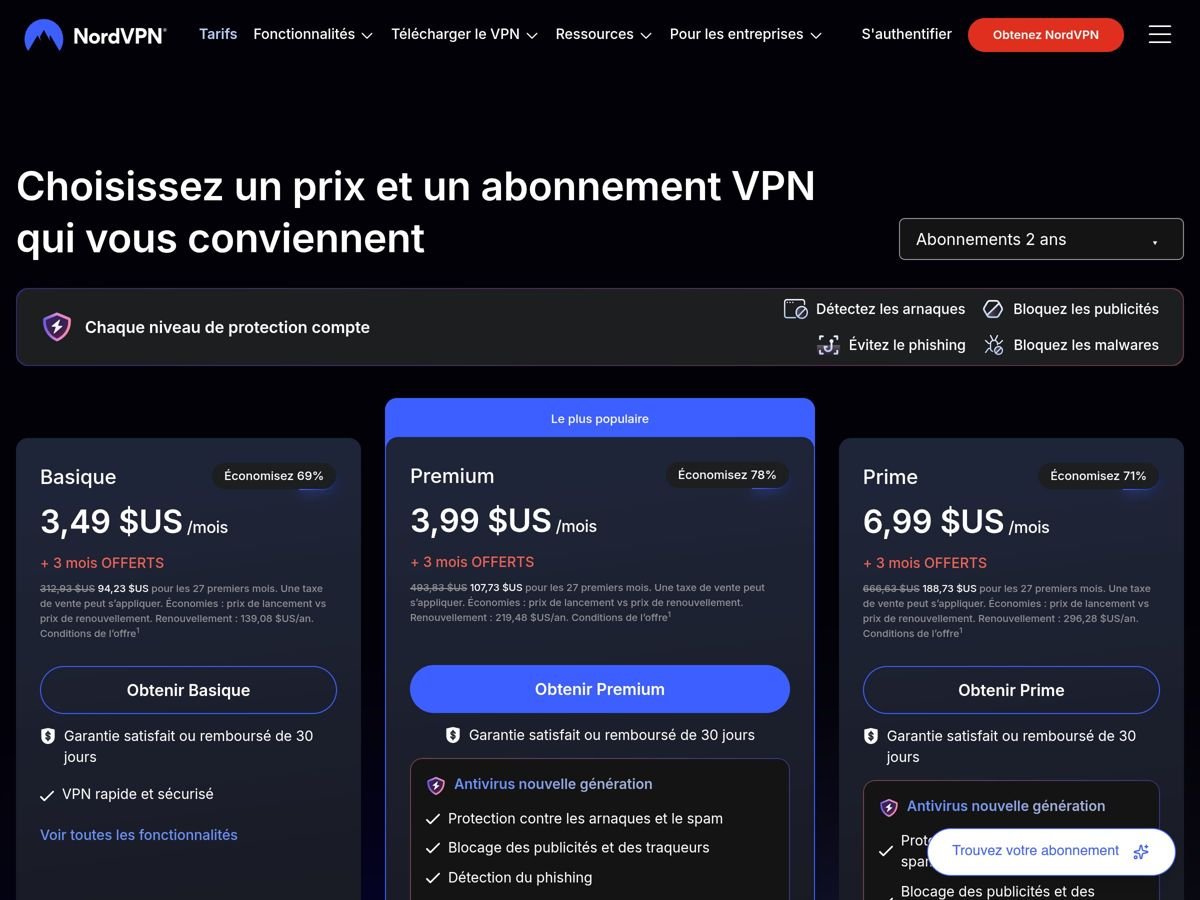
Keep in mind that renewal is clearly more expensive than the launch offer (€139.08 a year for the Basic plan according to the French page). Set a reminder before the end of the period so you can decide knowingly.
Proton VPN: best for privacy, with a free plan
Proton VPN is published in Switzerland and releases its apps as open source. Its strength for this use: a genuinely usable free plan, with no ads, no data cap, a kill switch and a no-logs policy, limited to one device and to servers in 10 countries assigned automatically. That is enough to secure ChatGPT on occasional public Wi-Fi. Paid plans add country choice, more devices and the NetShield filter (DNS-level blocking of ads, trackers and malware). See our Proton VPN review and the article on free Proton VPN.
ExpressVPN: the simplest, so you do not have to think about it
ExpressVPN targets the user who wants a “connect” button and nothing else. Its plans were renamed Basic, Advanced and Express Pro. The Basic plan was listed at about €2.50 a month over 28 months (€70 in total) on November 8, 2026, with a yearly renewal of €79.95. It uses the Lightway protocol and blocks ads, trackers and malicious sites. See our ExpressVPN review.
Surfshark: to protect the whole household
Surfshark allows an unlimited number of devices: it is the budget option if you protect several people’s phones, computers and tablets. The One plan was listed at €2.49 a month over 27 months (€67.23 in total) on November 8, 2026. Its pricing page did not, in our capture, detail features specific to untrusted Wi-Fi: read the product sheet before committing. See our Surfshark review.
For an overall ranking across all uses, see our best VPN comparison for 2026.
Why ChatGPT shows an error or a check with a VPN
If you see “Unable to load site”, a verification page or a “Verify you are human” loop, it is usually not a VPN fault. Services protected by anti-bot systems are wary of IP addresses shared by a very large number of users, which is the case for many VPN servers. Here is the order in which we try fixes, from simplest to most drastic:
- Switch server within the same country, or pick a less busy one.
- Disconnect and reconnect the VPN, then reload the page.
- Clear cookies for chat.openai.com and chatgpt.com, or try a private window.
- Use the official app instead of the browser, or the other way round.
- Check your DNS and for leaks: see our guide on DNS leaks.
- Use split tunneling to exclude ChatGPT from the tunnel if your VPN allows it: see split tunneling.
- Turn the VPN off for that session if you are on a trusted network (home). Nothing requires you to keep the VPN on all the time.
If you get repeated refusals while in a supported country, it may be an account or network problem: contact OpenAI support rather than cycling through VPN servers.
What about other AI tools (Claude, Gemini, Copilot, Mistral)?
The reasoning is the same for every consumer AI service: the VPN protects the connection, not your account or your messages. Each publisher has its own terms, its own list of supported countries and its own privacy settings. We did not capture all of them for this page: before using an AI tool through a VPN, open its “available countries” and “terms of use” pages and apply the same caution.
One point of vigilance concerns unknown AI tools (browser extensions, “unlimited free ChatGPT”, image-generation apps that ask for broad permissions). They are a frequent source of scams and malware. A VPN does not protect you from that; a threat filter and a little suspicion do.
Free VPNs and ChatGPT: the traps to avoid
Related searches on this topic show strong demand for a “free VPN for ChatGPT”. Our view is clear:
- Proton VPN Free is the only free one we recommend: it does not fund its service with ads or by reselling your data, according to the publisher’s commitments, and it imposes no volume cap.
- Unknown free VPNs in app stores are a real problem: some collect browsing data, show ads or heavily limit throughput. A VPN sees all your traffic, so it is the tool you should trust least by default.
- “Built-in VPNs” inside free AI apps are rarely real VPNs. Be wary of apps that ask you to install a VPN profile without an identifiable publisher.
To test a paid offer at no risk, use the 30-day money-back guarantee offered by NordVPN, Proton VPN, ExpressVPN and Surfshark. Our article on the NordVPN free trial explains what that guarantee really is.
What not to do
- Believing a VPN anonymizes your conversations. It does not.
- Using a VPN to get around an OpenAI geographic restriction. You risk account suspension and sometimes a blocked payment.
- Sharing a ChatGPT account or buying a “cheaper” one from a reseller. The terms prohibit sharing credentials, and such accounts are often scams.
- Paying for ChatGPT Plus from another country “to pay less”. We found no reliable method, and a mismatch between country, IP and bank card can block the payment.
- Installing an unknown free VPN to “test ChatGPT”.
- Entering confidential data believing the VPN protects it at the recipient’s end.
Sources and dates
OpenAI: help pages “ChatGPT Supported Countries” and “Data controls in ChatGPT” (captured November 8, 2026); OpenAI Terms of Use, Europe version (updated January 16, 2026, read November 8, 2026). VPN offers and features: official pricing and product pages of NordVPN, Proton VPN, ExpressVPN and Surfshark, captured November 8, 2026. Search intent and frequently asked questions: DataForSEO, Google US and France, November 2026 (monthly volumes are very low at this date, below 10 searches for most direct phrasings; demand comes mostly from related phrases such as “free” and “cheaper”).
Not verified: changes to OpenAI’s country list after November 8, 2026, other AI publishers’ terms, how each VPN server fares against OpenAI’s anti-bot protections (it varies day to day) and subscription prices after the promotional period. This page contains affiliate links: if you subscribe through them we earn a commission at no extra cost to you.
Verdict: which VPN for ChatGPT and AI tools in 2026?
- →Do you need a VPN for ChatGPT? No, not in supported countries. It protects your connection on a network you do not control, not your conversations.
- →The most complete? NordVPN, with 10 devices and a 30-day guarantee.
- →The most privacy-friendly? Proton VPN, with a free plan and no data cap.
- →The simplest? ExpressVPN, for anyone who wants no settings.
- →To protect conversations? Turn off model improvement, use Temporary Chat and enter nothing sensitive.
See also: best VPN 2026, VPN and public Wi-Fi, VPN kill switch, VPN for business travel, best VPN for iPhone and what is a VPN.